A full app grid
The visual, scannable grid macOS 26 took away — open it, see everything, click to launch.
Apple removed Launchpad in macOS 26 (Tahoe). You can set up a separate app grid with Facet Free on Apple silicon. Install Facet, import your old folders and order if macOS still has a readable layout, then set a keyboard shortcut. These steps leave Apple’s Spotlight Applications view available.
There is no built-in setting. Apple removed Launchpad from macOS 26 entirely. Its support pages for Tahoe don’t mention Launchpad, and there’s no toggle in System Settings to restore it.
The Terminal trick is dead. During the early betas a sudo command could temporarily re-enable Launchpad. Apple closed that loophole — in the final release, the same steps disable Spotlight and the new Apps view instead. Don’t use it.
The Apps view isn’t a replacement. Spotlight’s Applications view provides search, categories, and grid or list views. For manually arranged pages and named folders, set up Facet’s separate grid.
Public Facet releases are Developer ID signed and Apple-notarized before distribution, so they use the standard installation flow on macOS 26.
Open the DMG, drag Facet into your Applications folder, then launch it. Choose the Free edition to get the grid, folders, search and layout import.
Use the macOS account that had your original layout. If Facet finds a readable Launchpad database, import its app order and folders. Exact page breaks can change. See the import guide for the manual fallback.
Assign a free global hotkey so the grid opens instantly. A Launchpad-style hot corner is available as an optional Pro feature.
The visual, scannable grid macOS 26 took away — open it, see everything, click to launch.
Build custom folders and pages in Facet. When the old data is readable, imported folders and app order give you a starting point.
Type to find an app when you already know it — without losing the grid for everything else.
Facet Free keeps the fullscreen launcher available without payment. Facet Pro is an optional one-time upgrade for up to three Macs: $14.99 once. No subscription or telemetry-based growth loops. macOS 14.0 and later, including macOS 26 (Tahoe).
You can drag the Applications folder to your Dock for a basic grid stack, or try free open-source launchers. Those work, but they’re often limited or rough around the edges. Facet is the focused option with a permanent Free fullscreen launcher and an optional paid-once Pro upgrade — see the full comparison of launchers for macOS.
Sources: Apple Newsroom (macOS Tahoe 26, June 2025); Apple Support — Browse Modes in Spotlight; Macworld and MacObserver on the closed Terminal workaround (Sept 2025); 9to5Mac on Tahoe app-launching alternatives (Sept 2025).
Apple’s current guide to viewing and opening apps is the source for the built-in Spotlight Applications path. Facet’s free features, compatibility, and import behavior are checked against the public Facet repository and versioned release.
Facet Free keeps the fullscreen app grid, search, folders, ordering, and Launchpad layout import free. Pro Modes let you keep different app collections for work, design, and development. Switching a Mode changes what Facet shows; it does not launch or close apps. Pro also adds a floating compact launcher panel.
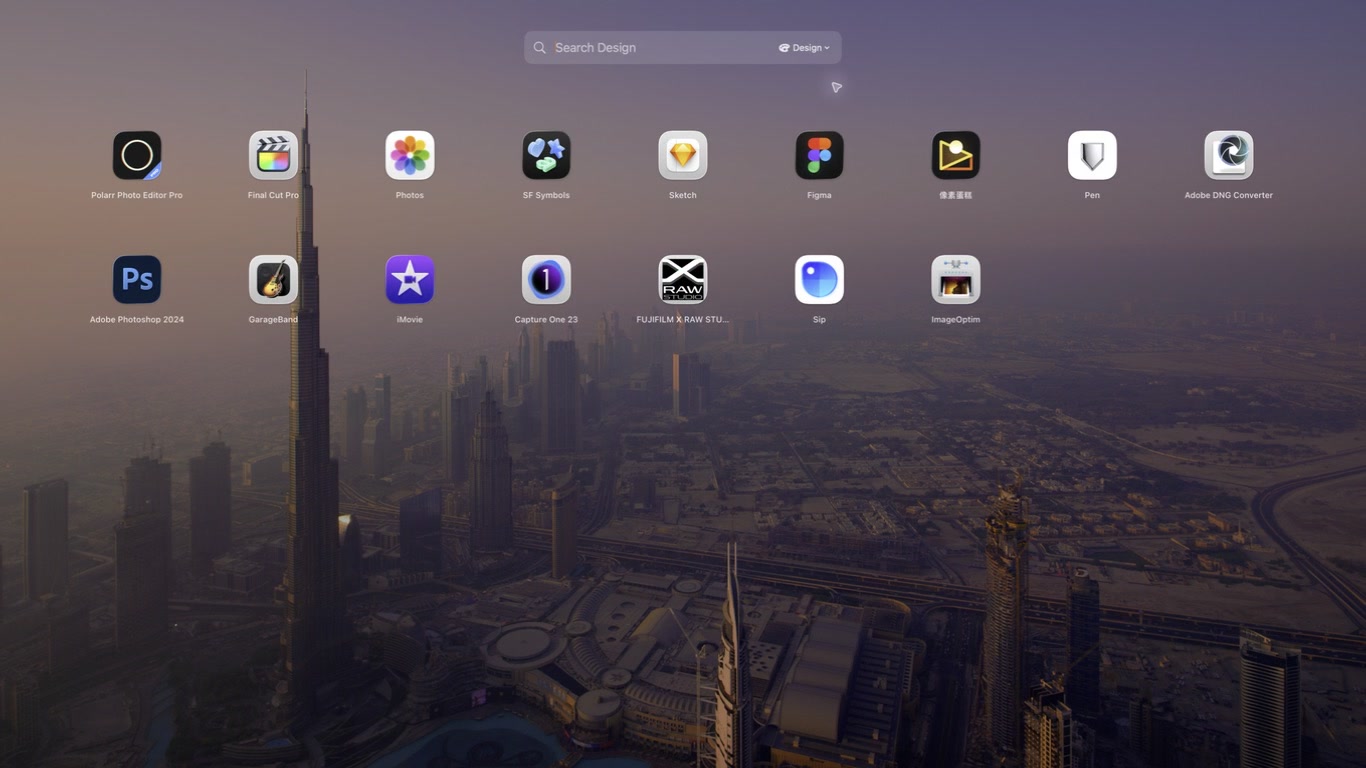
Watch the real 11.6-second Facet Modes demonstration. The recording uses the English interface.
Download Facet, then open the app and choose to start the optional 14-day Pro trial. No card, automatic charge, or subscription. Pro is $14.99 once for up to three Macs.